
Official List of iPhones Receiving iOS 27 and Its Latest Range of Features
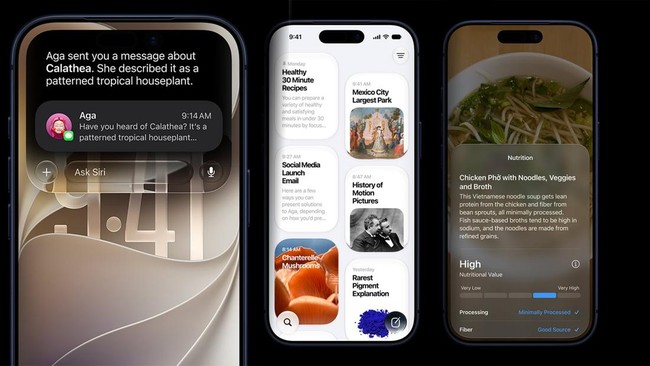
Apple has officially announced its latest operating system for iPhone, iOS 2 . Its availability is expected towards the end of the year, likely coinciding with the launch of the latest iPhone 18 series.
What is new in iOS 27? This update is quite significant in terms of both performance and features. One of the primary highlights is the enhanced capability of Siri AI and Apple Intelligence, which are becoming increasingly intelligent and personalised.
Latest Siri AI Capabilities
Siri AI’s capabilities in iOS 27 are designed to be more integrated into users’ daily lives. Users can ask Siri AI, powered by Apple Intelligence, anything from formulating ideas for creative projects to engaging in natural conversations.
In one specific scenario, when searching for old photos from several years ago, Siri AI can detect the location of the intended photo, even if it is buried deep within email inboxes or notes. Siri AI can also take direct action in applications such as Messages, Music, and Reminders based on real-time user needs. It can assist in quickly editing recently sent messages or adding a newly heard song to a specific playlist in Music.
Users can also ask various random and deep questions, as the smart assistant now possesses vast and profound knowledge across diverse topics. Additionally, a standalone Siri application will be available, which aggregates all conversations in one place, making it easy to find relevant information across the iPhone or other Apple ecosystem devices. Within the Camera app, Siri modes and Visual Intelligence allow users to search, enquire, and take action based on images captured by the camera.
Apple Intelligence Across Various Applications
Photo Editing: AI integration will simplify tasks. For instance, users can readjust angles and framing via the ‘Spatial Reframing’ feature. The ‘Extend’ tool allows users to expand image captures, while the ‘Clean Up’ tool enables cleaner removal of objects, even large ones.
Image Playground: Users can create unique, high-quality images in various styles, including realistic photos, simply by providing descriptions or prompts.
Suggestions: Users can receive recommendations for revising messages in Messages or Mail based on context. It is also possible to add events to a calendar or find specific photos with a single click.
Call Context: During calls, users can simultaneously search for relevant information from various apps. For example, while calling an airline, a user can request flight booking confirmation codes from their Mail.
Safari: In iOS 27, Safari tabs can be automatically grouped by topic. The ‘Safari Notify Me’ feature monitors pages for changes, such as price fluctuations or restocks in online shopping apps, notifying users when to act.
Fix Passwords: The Password app will provide alerts if passwords are weak or compromised, allowing users to update them easily with one click.
Child Protection and Parental Controls
Setup Assistant: Parents can select which applications are available to children to prevent access to risky platforms.
Ask to Browse: This feature requires children to request parental permission before accessing new websites.
Communication Safety: This feature protects children from exposure to or the sharing of pornographic content in Messages, FaceTime, and other services. Warnings will appear immediately if violent content is detected.
Time Allowance and Schedule: Parents can regulate access time for entertainment, games, and social media categories. Durations can be set based on age-appropriate expert recommendations and adjusted as needed. The Schedule feature allows parents to set specific access windows for certain apps.
Easy Access: Parental controls have been designed to be more intuitive and accessible via Settings, allowing parents to monitor usage and adjust access with a single click.
Performance and Design Enhancements
Liquid Glass: The futuristic ‘Liquid Glass’ design language can be further customised to improve readability. A new slider allows users to adjust the appearance from ‘ultra-clear’ to ‘fully tinted’ for maximum legibility.
Faster Performance: iOS 27 claims to provide faster overall performance, with app opening speeds increased by 30% and photo loading from the gallery improved by 70%.