
List of the Latest iOS 27 Features, iPhone Users in Indonesia Can Now Update
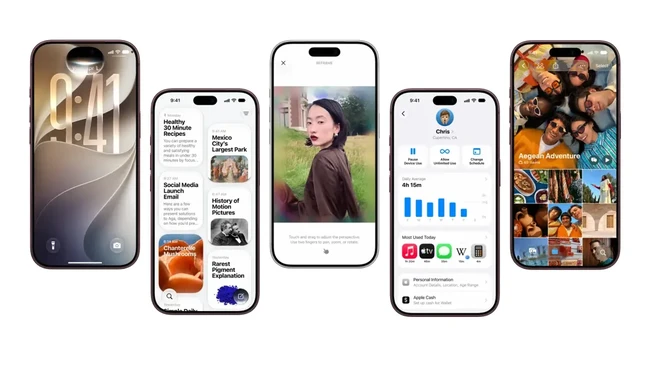
Jakarta, CNBC Indonesia — After being introduced at the launch event for the iPhone Duo, iPhone 18 Pro and iPhone 18 Pro Max, the latest operating system, iOS 27, has finally arrived for a wider range of iPhone users. The operating system is also now available in Indonesia.
There are many updates designed to improve the overall iPhone experience. This time, Apple has also prioritised iOS 27 as a means of creating a safer digital space for children. Here is a list of the latest iOS 27 features you can try:
Child Safety
One dilemma parents face when giving children access to electronic devices is ensuring their safety. On one hand, devices such as mobile phones are useful for staying connected with children and allowing them to use digital technology to access useful information, including for learning.
Even so, there is a great deal of harmful content available in the online sphere. To that end, Apple is working to reduce the risks of iPhone use for children while giving parents peace of mind. Here are several features available in iOS 27.
Child Account
The most fundamental step parents must take is setting up a Child Account. This feature automatically activates age-appropriate content and privacy protections across all Apple devices, complete with stronger parental controls.
- Restricting App and Web Access
From this year, parents can set more selective “gateways” for their children.
Ask to Buy: Children must request parental approval before downloading a new app.
Ask to Browse: A new feature that extends this approval function to the web browser (particularly Safari). Parents can filter which websites their children are allowed to visit.
- Controlling Children’s Digital Interactions
Parents now have full control over who can interact with their children via the Messages, FaceTime and Phone apps.
Communication Safety: This feature automatically blurs pornographic content in photos or videos received by children, and warns them before they send such material.
Extreme Content Filter: This safeguard has now been enhanced to detect and then block extreme violent (gore) and sadistic content.
- Screen Time Management
The issue of phone addiction is being tackled through a more intuitive Screen Time update:
Time Allowances: Parents can set more flexible time allocations based on app category (Entertainment, Games and Social Media), complete with expert research-based guidance.
Schedules: Parents can set specific schedules for which apps children can access at certain times, on both weekdays and weekends.
Monitoring Dashboard: Parents can check their children’s device habits at a glance and change access permissions with a single tap.
- Collaboration with Developers
Not just consumers — Apple is also calling on app developers to create child-friendly experiences by providing dedicated APIs at [https://developer.apple.com/kids]. Comprehensive information about this ecosystem can also be accessed directly via Apple’s official Child Safety website.
A New Look: Liquid Glass Design
The design sector receives a major update, focusing on the Liquid Glass visual element that makes the screen display sharper and easier to read:
Neater Diffusion Effects: Content behind the glass view is now blended more smoothly. Combined with darker edges and brighter specular highlights, control buttons appear more “alive” and separate from the background.
Customisable to Taste: Through the Settings menu, users are now given a dedicated slider to adjust the intensity of Liquid Glass, from ultra-clear to fully tinted — simply slide to your preference.
More Expressive App Icons: App icons are now equipped with an additional Liquid Glass layer to enhance detail and sharpness, whether in light, dark, tinted or all-clear modes.
Faster Performance
Apple promises an elevated user experience through iOS 27, not only for the newest models but evenly across older iPhones as well.
All daily activities, from unlocking the screen, swiping through the Home Screen, to navigating the Control Centre and App Library, are claimed to feel far smoother. Here are the speed improvements Apple has prepared in iOS 27:
- Everyday Features, Faster
Apple has detailed several significant performance improvements compared to the previous version:
Faster App Launching (up to 30%): iOS now preloads key app data in the background, making apps ready to use in an instant.
Speedier AirDrop Transfers (up to 80%): Sharing large photos or documents to other devices is now far more efficient, without long waits.
Instant Photo Gallery (up to 70%): As soon as you take a new photo or record a video, you can view it immediately in the Photos app without any loading delay.
Camera Ready in Low Power Mode: Opening the camera while Low Power Mode is active is now quicker, ensuring precious moments are never missed even when the battery is running low.
- New CPU Scheduler
Behind the scenes, Apple has overhauled the CPU scheduler, the component that manages how processor workloads are distributed throughout the day. As a result, heavy tasks can be processed far more efficiently without sacrificing battery life.
This improvement is not exclusive to new iPhones. Apple has extended these internal optimisations as far back as the iPhone 11, giving loyal users of older devices a second wind to keep operating smoothly.
Snappier Connectivity
Switching networks from Wi-Fi to mobile data (or vice versa) is now seamless.
If you are on a FaceTime video call while walking out of the office, or plotting a route in Maps while leaving home, the iPhone will switch connections smoothly in the background.
Users no longer need to open the Control Centre to manually turn off Wi-Fi in order to get a stable signal.
Faster Search Features
Apple has also rebuilt the foundations of the search system powering Spotlight, the Photos app and Mail, so that data indexes are updated in real time throughout the day.
Instant Email Results: Specifically in the Mail app, a new ranking system surfaces the five most relevant emails in the Top Results section.
With this refinement, the important email you are looking for is guaranteed to appear right at the top, without having to scroll down one by one.
Improvements to Apple’s Built-in Apps
Messages: Send Jumbo Photos Without the “Pending” Hassle
Continuous Send: Sending large photos or videos over a low-bandwidth connection no longer holds up your subsequent texts. You can keep typing and replying while media files are processed in the background.
Send Status Indicators: Every outgoing message is now clearly marked, so you know exactly which messages were successfully delivered.
Cleaner Group Chats: Stacked Tapback notifications in groups are now neatly summarised into a single notification (for example: “John and 2 others liked your message”). No more screens flooded with repeated notifications.
- FaceTime: Show Your Face and Your Surroundings Simultaneously
- Dual Capture: During one-on-one video calls, you can activate the front and rear cameras at the same time. Ideal for those who want to chat face-to-face while showing objects or their surroundings in real time.
- Apple Maps: Cities Around the World Rendered More “Alive”
- Enhanced Flyover: Thanks to a combination of aerial imagery and the Vision Intelligence model, hundreds of cities worldwide are rendered in super-sharp detail. From building architecture to every individual tree, everything looks remarkably lifelike, no longer stiff as before.
- Apple Music: Smoother Automatic DJ and More Dynamic Artist Profiles
More Immersive AutoMix: The automatic song-transition feature is now as smooth as a DJ’s, and its update has officially extended to the tvOS version of Apple Music and HomePod smart speakers.
New Artist Pages: Musicians’ profile pages are now supported with graphics and motion elements, making their pages feel more dynamic.
- Early Detection of Perimenopause
Smart Notifications (Cycle Tracking): The system in the Health app can now read changes in your menstrual cycle pattern. If your monthly rhythm begins to show indications of the perimenopause phase (the transition period before menopause), the iPhone will automatically send a notification.
Daily Symptom Logging: Users can record various complaints or bodily changes experienced daily during this phase.
Photos: More Intuitive and Less Fiddly
- More Flexible Shared Albums
Full-Resolution Quality: Sharing photos and videos is no longer compressed, with support for a variety of popular file formats.
Cross-Ecosystem: Friends using Android phones or Windows PCs can now join in and contribute their own photos directly via the iCloud.com website.
30-Day Auto-Delete: Want to share photos temporarily without cluttering an album? You can set a shared album to expire automatically after 30 days. Saving all its contents to your personal gallery takes just one tap.
- Easier Video Editing and Slideshows
Instant Slideshow Creation: Gather your favourite photos or videos and turn them into a slideshow. Users can set slide transition durations, transition styles and add music. The result can then be saved directly as a video file in your gallery.
Automatic Screenshots from Video: Want to capture a single frame from a cool scene in a recording? Just one tap — no more fiddling with button combinations for a screenshot.
- Gallery Management, Upgraded
‘Captured by Me’ Collection: Want to view only photos you took yourself (even on an older iPhone)? Simply open this dedicated collection, untainted by photos downloaded from WhatsApp.
Selection View: Cut down the time spent selecting multiple photos at once, including tidying up metadata such as photo locations.
Keywords and Star Ratings: Add keyword labels or a 1-to-5-star rating system to photos, making searching through old archives lightning fast.
24-Hour iCloud Sync Priority: Desperate to have all new photos uploaded to the cloud immediately? Activate this option so your iPhone syncs at full speed for an entire day (albeit at some cost to battery life).
- AirPods: Customise Your Equaliser to Taste
- Custom EQ: AirPods users can now tailor the sound characteristics of their favourite earphones. You are free to adjust low, mid and high frequency levels directly from the AirPods settings menu.
- GymKit on iPhone: Workouts More Connected
- Gym Equipment Sync: With just one tap, the iPhone can connect directly to treadmills, indoor bikes and other compatible fitness equipment. Data such as calories, distance, speed, incline and tempo will sync automatically with high accuracy, without fiddly manual settings.
- Apple Home: Monitor Your Home in 4K
- More Reliable, 4K Recording: The Home app now natively supports 4K resolution for HomeKit Secure Video cameras. Footage is guaranteed to be sharper and more detailed, whether monitoring your home in broad daylight or in the dark of night.
- Clock App: No More Oversleeping Drama
- Independent Alarm Volume: The most long-awaited classic feature! You can now set the alarm volume separately from the system/ringtone volume. So you can confidently leave your phone on silent all night, yet still be sure you will wake up on time for that early-morning meeting.
- Home Screen: Giant Widgets
- Extra-Large Widgets: Bored of the same old app layout? Users can now dedicate an entire Home Screen page to a single giant widget. Available for Calendar, Photos, Music and other selected apps.
List of iPhones Eligible for iOS 27
iPhone Duo
iPhone 18 Pro
iPhone 18 Pro Max
iPhone 17 Pro
iPhone 17 Pro Max
iPhone Air
iPhone 17
iPhone 17e
iPhone 16 Pro Max
iPhone 16 Pro
iPhone 16 Plus
iPhone 16
iPhone 16e
iPhone 15 Pro Max
iPhone 15 Pro
iPhone 15 Plus
iPhone 15
iPhone 14 Pro Max
iPhone 14 Pro
iPhone 14 Plus
iPhone 14
iPhone 13 Pro Max
iPhone 13 Pro
iPhone 13
iPhone 13 mini
iPhone 12 Pro Max
iPhone 12 Pro
iPhone 12
iPhone 12 mini
iPhone 11 Pro Max
iPhone 11 Pro
iPhone 11
iPhone SE (second generation and newer)
Source: jawawa.id (https://jawawa.id/newsitem/list-of-the-latest-ios-27-features-iphone-users-in-indonesia-can-now-update-1789455145)
Originally published by CNBC Indonesia (https://www.cnbcindonesia.com/tech/20260915120227-37-768005/daftar-fitur-terbaru-ios-27-pengguna-iphone-di-ri-sudah-bisa-update), translated from Indonesian