
How to Use Instagram Instants and Its Features, Newly Released in Indonesia
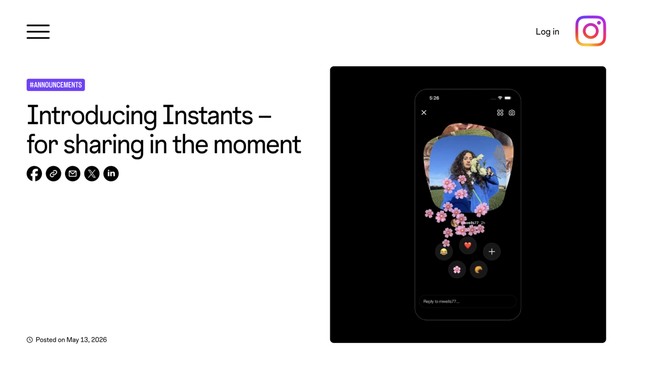
Instagram has launched a new feature called Instants that is accessible through the Direct Message (DM) tab. The feature provides a new way for users to share spontaneous, unfiltered moments with friends. Instagram Instants was rolled out gradually on 13 May 2026. Some users in Indonesia have already received the feature on their Instagram apps on their mobile devices. Moments in Instants are temporary for viewers, but are saved in the user’s archive for up to one year. The content can also be shared again as a recap to ‘Stories’. Friends can react and reply, with direct replies appearing in the DM. There is also a companion Instants app for faster camera access. The protection features ‘Full Teen Accounts’ and ‘Family Center’ fully apply, including sharing time limits, ‘Sleep Mode’, and parental supervision. In short, Instants behaves similarly to Stories that share daily content. The difference is that Instants are limited to photo-format content. Additionally, Instants photos disappear after being viewed by friends. Instants are located at the bottom right of the user’s DM inbox. By tapping the ‘+’ icon or the stack of friends’ photos that appear, users can share unfiltered moments to Close Friends or mutual followers. There is no editing, so content is truly authentic. How to Use Instagram Instants - Open your Instagram inbox and tap the stack of photos at the bottom right. - You can add a caption, but you cannot edit the moment as you can in Stories or the Feed. - Choose who to share the Instants with—Close Friends or Friends. Friends can react, reply, or also share Instants. - Tap the white button beneath the camera to share as many moments as you want. Tap the ‘undo’ button to automatically delete a moment before it is shared with friends. - Instants that are shared will appear as a stack of photos at the bottom of your friends’ DM inbox, and then disappear after they are viewed. Key features of Instagram Instants - Archive: Moments shared to Instants will automatically be saved to your personal archive. You can view them at the top-right of the Instants feature. - Recap to Stories: You can assemble Instants moments in the archive and then share them to Stories for all followers to see. Just press ‘Create Recap’ in the archive. - Undo: If you share an Instant by mistake, you can delete it immediately by pressing the available undo button. - Snooze: Press and hold the Instants message stack near your inbox, then swipe right to temporarily stop viewing it. Reactivate Instants by pressing and holding the same spot and swiping left. Instagram also offers a standalone Instants app in some countries. This allows users to participate in Instants without being active on Instagram.