
How to Download HD Facebook Videos Using FvidGo
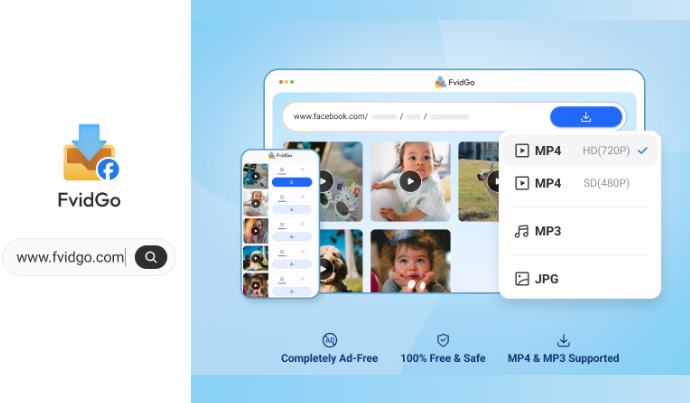
Have you ever felt frustrated when trying to save a cool video from Facebook, only to find that the result is pixelated like a recording from the 90s? Have you tried various websites, only to be bombarded with endless pop-up ads, or forced to click on things that redirect you to dubious websites?
Tired of tools that promise much but deliver little, you might consider using FvidGo: a Facebook downloader.
FvidGo is designed to put an end to that frustration. This platform is designed so that anyone, even those who are not very tech-savvy, can have a collection of high-quality Facebook videos without any hassle.
People’s needs for downloading Facebook videos vary. Some just want to save funny videos from their feed, others want to collect cooking videos from the Watch page, and some want to get audio from music videos to listen to while on the go.
FvidGo understands this dynamic, so its features are designed to be as comprehensive as possible in one place.
Videos that appear in your timeline or on the Watch menu can be downloaded directly in MP4 format. The options are flexible; if you’re on a tight data plan, you can choose SD, but if you want visual quality that pleases the eye, just choose the HD option. Everything still works smoothly.
Reels are very popular now, with lots of creative content that would be a shame to only watch once. In FvidGo, you can download Reels complete with audio. In addition, the feature to save Stories is also a lifesaver. We know that Stories disappear in 24 hours, right? Well, before they disappear, you can save them to your gallery.
It’s not just good at handling videos; if you find a post that contains a gallery of photos or a large number of albums, you don’t have to save them one by one manually. FvidGo can help you take those photos in their original (HD) quality very easily. This is a feature that is rarely found on ordinary downloader sites. Usually, if the video is set to private or is only for a specific group, ordinary downloaders will fail to read the link. But FvidGo has the technology to overcome this with a high success rate, as long as you still follow the existing security procedures.
You don’t need to be an IT expert to use this service. Everything is instant, it only takes a few clicks from any device you have now.
There are many similar tools on the internet, but the problem is not just about being able to download or not. It’s about convenience and privacy. Many free sites secretly record what you download or even ask you to log in to your Facebook account to their system. That’s very dangerous for the security of your account.
“FvidGo doesn’t ask for any personal data. We only need the video link, the rest is done by the system without having to know who is downloading or what video is being taken. User privacy is everything.”
In addition, its “clean” interface is really helpful. You won’t be trapped by clicking on fake download buttons that are usually just trap ads. Here, what you see is what you get. The process is honest and doesn’t involve “puzzles” to find the real button.
Questions about security are natural when you want to use a third-party service to access content from a large platform like Facebook. The good news is that FvidGo is designed with a very security-conscious approach from start to finish.
First, FvidGo doesn’t ask you to enter your Facebook username or password at all. This is very different from some similar services that ask for account login access before they can be used.
How FvidGo works is quite simple: you just provide the video link, and the system will work on its own in the background.
Second, the FvidGo interface runs entirely through a browser without the need to install additional applications. This means that the risk of you downloading dangerous files or fake APKs is zero. All processes take place online and directly, without saving any data on your device during the session.
Third, the FvidGo site uses an encrypted HTTPS connection, so the data you send (in this case, only the URL of the video) is protected from potential interception.
In short, as long as you use it according to the procedure and do not share private video links that do not belong to you, FvidGo is a safe and reliable choice.
If you are the type of person who often saves videos for editing or just for a collection, there is a trick to make access even faster. FvidGo supports PWA (Progressive Web App) technology. How to do it: when you open the FvidGo site on Chrome (Android) or Safari (iPhone), look for the “Add to Home Screen” menu. Then, a FvidGo icon will appear on your phone’s menu like a regular application. So, if you want to use it again, just click on that icon without having to type the URL again. This is much easier than installing an APK application from an unclear source that risks getting a virus.
Nowadays, visual content is everything. Whether it’s for presentation material, personal archives, or to be shared again in a family group, high-quality video is a must. FvidGo provides a simple solution: a tool that really works as intended without making your head spin because of ads. The servers used are also not ordinary. Download speeds are optimized so that they don’t take too long, especially if the video file size is quite large because of the HD resolution. So, even if you are using a regular connection, the process still feels faster.
FvidGo is the answer for those of you who are looking for efficiency. Free, no login required, supports all types of Facebook content (Video, Reels, Stories, Photos), and has a very user-friendly interface. No matter what device you use, whether it’s an old Android phone, the latest iPhone, or a work laptop, everything can run smoothly in the browser. So, if you find inspiring or funny videos on Facebook tomorrow, you already know where to go.